


Yes. OurFamilyWizard message reports are supported.
On Choose your messages, select OurFamilyWizard, iPhone messages, or both.
The imported OurFamilyWizard conversation is stored for this session only. If the file cannot be read, or you cancel, you return to Choose your messages.
OurFamilyWizard contacts appear separately from iPhone and WhatsApp contacts.
AppClose and other co-parenting apps are not supported yet.
No. Dispute Buddy cannot import notes from a note-taking or AI note-taking app.
It can use:
WhatsApp is read from the iPhone alongside SMS and iMessage. It is not a separate file upload.
Dispute Buddy works on computers that have MacOS 13 or later installed.
If your computer doesn't give the option of updating MacOS to 13, you'll need to find another laptop of computer.
Just enter www.disputebuddy.co/download on any computer enter your email and you can connect your iPhone and use the app.
Dispute Buddy is a desktop app, so you download and run it on your computer then connect your iPhone to analyse and export messages.
You can use Dispute Buddy with one iPhone (or iPad).
You can download the desktop app onto as many computers as you like.
If you need to export messages from more than one phone, contact us at support@disputebuddy.co or click "Talk to a human" in the app.
It finds patterns that show::
Coercive control
Gaslighting
Emotional abuse
Financial abuse
Child welfare concerns
If you're looking for specific things that happened eg
When your child broke their leg
An argument about an engagement ring
When the children went to swimming lessons
You can do that after you've downloaded the Dispute Buddy Report to your desktop
This is how you search for these themes, ideas and events in your texts:
Download and save your Dispute Buddy report to your computer
Open the PDF in your usual program (eg Preview or Adobe or similar)
Hit ctrl-f on your keyboard
You'll be able to search for keywords and themes in the PDF
WhatsApp message history does show when video calls and voice calls took place and when voice notes were sent although you can't see or read any of the content
This is not true for iMessage though. You can only see text message history
We have very little information on you. We do that on purpose because one of our company values is 'good for all'. We make decisions that are good for you, good for us, good for everybody. Keeping your data is not good for anyone.
What we can see:
Your email address: so we can contact you if you need suppport, and also so that we can match you up with your subscription.
The name you enter on the first screen in the app: this is the name that we put on your message report at the end
Date ranges: we can see the date range that you enter to do the message export. This is useful for us to give technical support
The number of texts our system is processing for you
Which screen you are progressing through in-app
What we can't see is:
Your contact that you search for
Any of your texts, messages, videos, images
Nothing at all from your iPhone
Basically we don't know anything personal about you apart from your name and your email address
No. You can change the selected contacts or date range and generate another report in the same session.
If encrypted messages from an earlier session are still on this computer, Dispute Buddy skips How it works. Connect the iPhone to unlock and decrypt the existing index; this is much quicker than indexing it again.
You can then unplug the phone and continue. Choose re-index only when you need newer messages that are not in the existing index. Re-indexing takes about an hour.
I'm sorry, we don't do discount codes!
However, depending on your country, we offer Klarna so you can split your payments.
Just select the option at checkout.
Your Dispute Buddy account allows you to download text messages from one iPhone.
You can download your texts to as many computers as you want.
If you want to download messages from more than one iPhone, just message us at support@disputebuddy.co or click "Talk to a human" in the app.
We'll ask you a few questions and if that goes well, we can up your limit for you.
To connect a second iPhone:
Just go to www.disputebuddy.co/download on your second (or third or fourth!) computer
Once downloaded, launch the app
Enter the email address you used to buy the app
You can download messages from one iPhone onto as many computers as you like
We chose something to make it easy to explain away to anyone.
Your bank statement will show BUDDY APP
This is a really common question and I can tell you the answer is no.
When you run Dispute Buddy on your computer, the only place that activity occurs is on your computer.
No one on your phone gets notified that you're downloading texts.
Dispute Buddy can be used in any country.
Message history PDFs can include texts in any language.
Messages of Interest and Full Behaviour Analysis currently work with English, Spanish, French, German, Portuguese, Italian, Dutch, Russian, Chinese, Japanese, Korean, Arabic, Polish, Turkish, Swedish and Czech.
The Dispute Buddy report's message history will look exactly how it looks on your phone when the message was deleted.
Apple changes how deleted messages are shown from time-to-time.
It might say 'this message was deleted' in the thread.
But Dispute Buddy can't recover the content of the deleted message.
Similarly, if you want to export older messages that are in your iCloud, you'll need to see the messages on your iPhone for them to be exported by Dispute Buddy.
Dispute Buddy is an app that you download onto your computer desktop.
You can still pay for it on your iphone and then go on to your computer.
On your computer, go to www.disputebuddy.co/download
Launch the app from there
The longest step is encrypting and indexing messages from an iPhone. Set aside about an hour for that.
Keep the iPhone connected to your computer and keep the computer connected to power until Dispute Buddy tells you it is safe to unplug the phone.
If you are using an OurFamilyWizard Messages Report without iPhone messages, you skip the phone and encryption step.
If encrypted messages from an earlier session are still on this computer, reconnecting the iPhone is a short unlock and decrypt step. You only need to re-index for about an hour if you need newer messages.
After that, select your contacts and dates, choose a report type, and generate the PDF.
1. Make sure your iPhone is connected to your PC.
2. Unlock your iPhone. You may need to enter your passcode to "Trust this Computer."
3. Open the Apple Devices app on your computer. (If you don't have it, download it from the Microsoft Store — search for "Apple Devices".)
4. Click the iPhone device icon (it can take several minutes to appear while Windows sets up the connection).
5. Untick "Encrypt local backup."
6. Type the password you used when you first set up encryption. If you don't know the password, see steps at the bottom of this page in 'How to delete your encryption password'
7. Click "Don't Encrypt," then stop the backup that automatically starts.
1. Make sure your iPhone is connected to your Mac.
2. Open Finder.
3. Click your iPhone under "Locations" in the left sidebar.
4. On your iPhone, tap "Trust This Computer" (if prompted) and enter your passcode.
5. On your Mac, click "Trust" or "Continue."
6. Go to the "General" tab in the Finder window of your computer
7. Under Backups, select: "Back up all of the data on your iPhone to this Mac."
8. Make sure "Encrypt local backup" is unchecked.
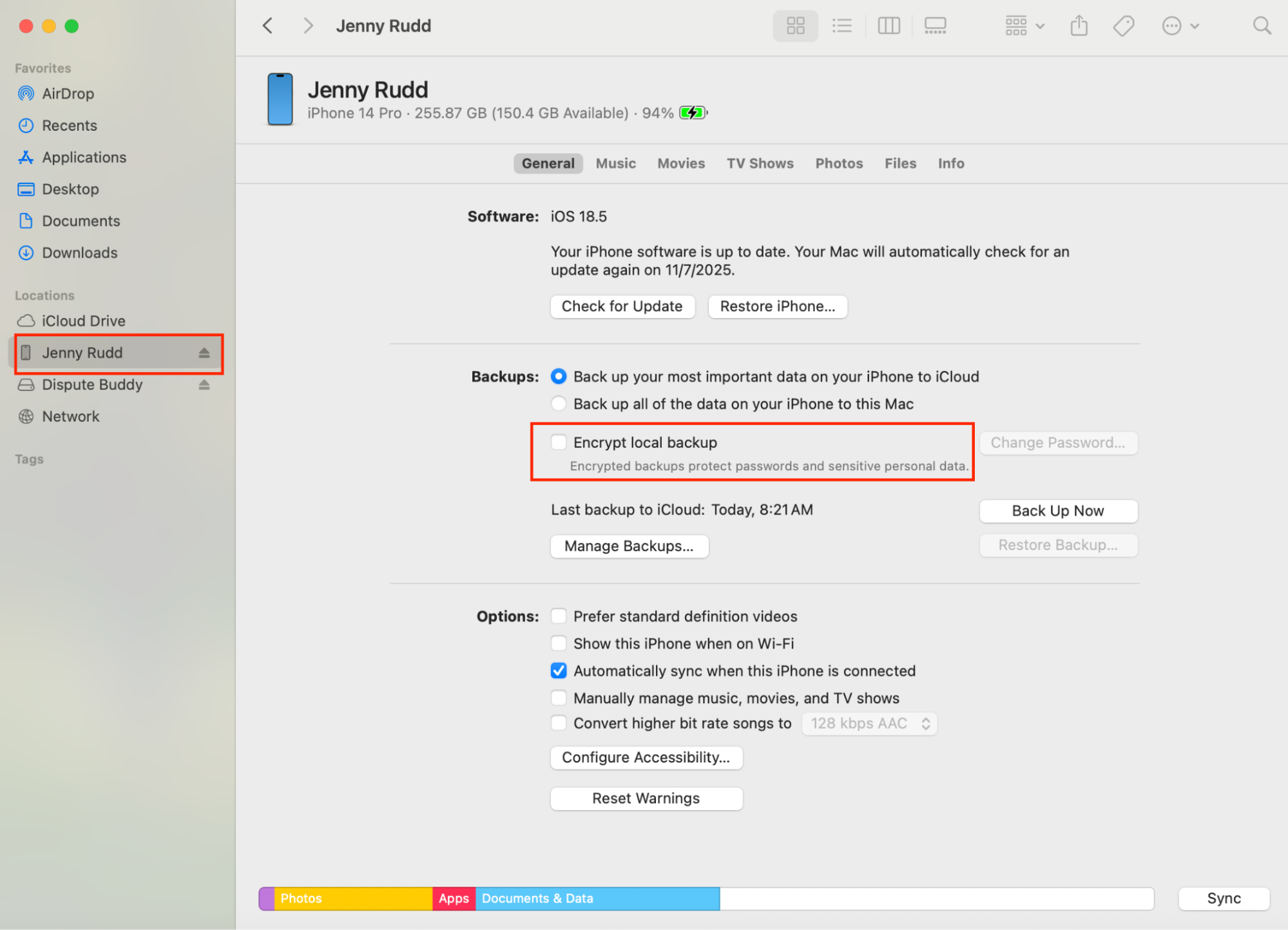
9. Type the password you used when you first set up encryption
10. If you can't remember setting up that password, follow the instructions below to delete it
If you don't know this password, you'll need to reset it.
On your iPhone, go to
Settings > General > Transfer or Reset iPhone > Reset > Reset All Settings.
This clears the backup encryption setting.
It wont delete apps, or photos or messages. They're all safe.
What It DOES NOT Delete
What It DOES Reset
Dispute Buddy runs on any modern Windows PC or Mac. If your computer is really old or has a very slow processing speed, this can impact the time taken to encrypt the data or generate reports.
There are three report types to choose from.
A chronological, searchable PDF of the messages from the contacts and dates you selected.
Everything in Messages only, plus a timeline of flagged messages. This report does not include an analysis write-up.
Everything above, plus an analysis of patterns including coercion, manipulation, bullying and harassment.
.png)
The last two reports use your behaviour-analysis allowance.
Before a behaviour-analysis report starts, the app warns that the findings can be hard to read. You can choose to analyse both sides of the conversation or only messages you received.
If your selection is over the message or size limit, the app warns you that older messages will be dropped.
Your finished report is a PDF that you download to your computer.
Download Dispute Buddy on your Mac or Windows computer from www.disputebuddy.co/download.
When the app opens, enter the same email address you used to buy it. Then choose whether you want to use iPhone messages, an OurFamilyWizard Messages Report PDF, or both.
If you choose iPhone messages, restart the phone first, connect it with an Apple or good-quality USB cable, and watch the phone for passcode prompts. Keep it connected until Dispute Buddy says it is safe to unplug.
Here's what you'll need to download your texts for court when you are downloading texts from an iPhone to Windows/PC
- Connect your phone
Use an Apple (or good quality) cable to connect your iPhone to your PC. Drivers are installed automatically when you set up the Dispute Buddy app.
- Go to www.disputebuddy.co/download
- Launch disputebuddy.exe from the downloads folder
- Follow instructions to install the Dispute Buddy app
- Open Dispute Buddy from your Windows Start menu
Here's what you'll need to download your texts for court from an iPhone to a Mac
You'll need an Apple cord to connect your iPhone to your computer. You need to use an Apple cord, cheap ones don't work.
Go to www.disputebuddy.co/download
Open DisputeBuddy.dmg from the downloads folder
Drag Dispute Buddy icon into Applications folder
Open Applications folder
Launch the Dispute Buddy app
Dispute Buddy automatically saves your report in your downloads folder
Open your downloads folder and look for the file name
message_timeline1.pdf
Open by double-clicking or right-clicking and selecting Open
It's possible that when you saved your report, you selected a different folder
If all else fails go back to the app and download another report
We cannot tell you what monitoring or security policies apply to your work computer, so check whether using it is safe for your situation.
For iPhone messages, Dispute Buddy creates an encrypted index on the computer. That index can remain there after you close the app, so you can reconnect the iPhone for a short unlock and create more reports without another hour-long index.
An OurFamilyWizard import is stored for the current session only.
If you choose Full Behaviour Analysis, the selected messages are sent to Dispute Buddy's secure cloud for analysis and deleted when the analysis is complete.
The PDF is downloaded to your computer. Delete the PDF and any locally stored Dispute Buddy data yourself if you do not want them left on a work computer.
WeChat isn't supported at the moment, but this feature may be added in the future.
You do not need to create an account or password to use Dispute Buddy.
We take the email address that you used when you purchased the app and register you as a subscriber with that email address.
That's why, when you launch the app you need to enter the same email address that you used to purchase the app.
If you've forgotten which email you used, just email us at support@disputebuddy.co and we can have a look for you.
Dispute Buddy cannot read messages from an Android phone.
Phone-message encryption currently supports iPhone only. There is no Android release date.
If the messages you need are in an OurFamilyWizard Messages Report PDF, you can import that report in the Mac or Windows app without connecting an iPhone.