Download Dispute Buddy for Mac

Thanks for your purchase.
Follow these simple steps to install Dispute Buddy on your Mac

1. Download the application

Download DisputeBuddy.dmg to get started (75MB).
Click the button below to download the installer
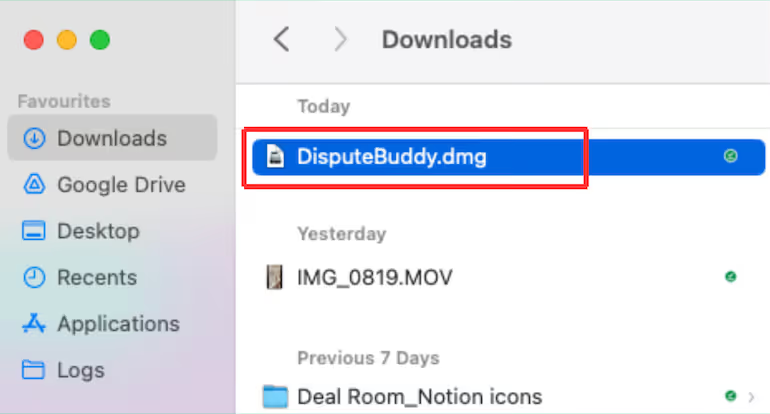
2. Open from the downloads folder
Locate the downloaded DMG file in your downloads folder
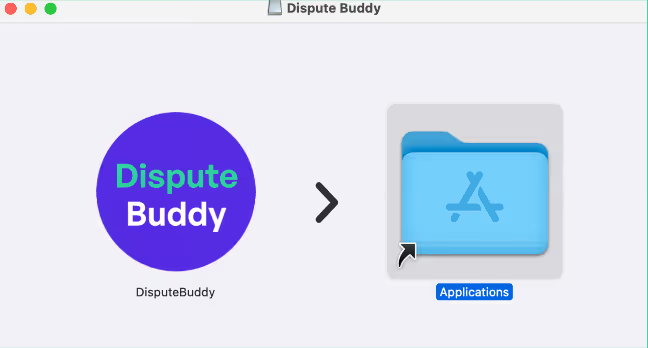
3. Drag into the applications folder
Drag the Dispute Buddy app into your Applications folder
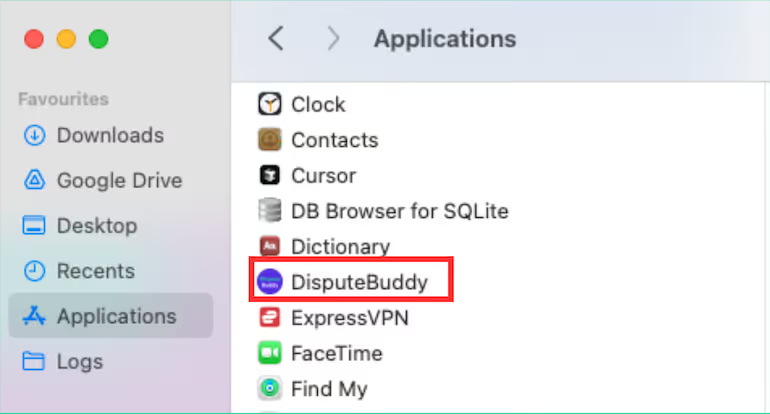
4. Open from the applications folder
Launch Dispute Buddy from your Applications folder

How it works

Download the app
Download the Dispute Buddy app onto your desktop. Open from downloads folder, drag into Applications, then open the app.
Connect phone
Use an Apple cord (not a cheap one) to connect your iPhone to your Mac. We'll check you have enough storage too. If you don't, you can connect a hard drive.
Enter contacts
Use an Apple cord (not a cheap one) to connect your iPhone to your Mac. We'll check you have enough storage too. If you don't, you can connect a hard drive.
Wait
The search takes around 30 minutes. You can still use your phone and laptop/computer during the search. Just make sure they stay plugged in, or you'll need to start again.
Export to PDF
We'll organise your chat threads, and you can download them to PDF, ready to send to your lawyer.
Repeat as many times 
as you like
Go back and select more contacts, or different group chats, or a new date range. Download as many PDFs as you like.

Need help? 

Download unsuccessful? 
Like us to walk you through it? 
Or contact us at